
With the controller layer wired up and endpoints live, the next challenge was trust. You can write a service method, call it from a controller, and assume it works — but without tests that exercise the full stack from HTTP request to database response, that assumption is fragile.
This week had two goals: replace that assumption with evidence, and add something the system genuinely needed — real-time notifications between the server and the admin dashboard.
Why Integration Tests Over Unit Tests Here#
For the controller layer specifically, unit tests with mocked services would miss the most common failure modes:
- Route parameters parsed in the wrong order
- Query param parsing throwing the wrong exception
- JSON serialization producing a shape the tests do not expect
- Database behaviour that differs from what the service assumes
REST-assured tests spin up the actual Javalin server and send real HTTP requests to it. When a test passes, it means the full path from URL to database and back works correctly — not just that individual methods return the right values in isolation.
Testcontainers: A Real Database Without Touching Production#
Integration tests only matter if the database behaves like production.
Instead of mocking the database or relying on an in-memory substitute, every test in this project runs against a real PostgreSQL instance — started automatically inside Docker using Testcontainers.
Test Isolation with Testcontainers#
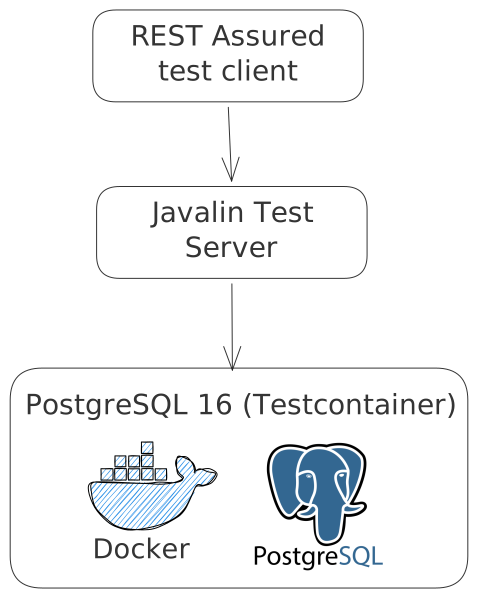
The diagram shows the full execution path of an integration test.
A REST-assured test acts as a real client, sending HTTP requests into the Javalin server. From there, the request flows through the application and into a PostgreSQL database running inside a Docker container.
The important detail is isolation:
- The database is created fresh for each test run
- It is identical to production (PostgreSQL 16)
- It is destroyed automatically when tests finish
- It is never connected to real data
This means every test runs in a clean, predictable environment while still using the real database engine.
With a single JDBC URL change, Testcontainers handles everything — pulling the image, starting the container, and wiring the connection.
The TestPopulator: An Investment That Keeps Paying Off#
Early in the project I built a TestPopulator class to seed a realistic dataset for DAO tests — stations, users, allergens, dishes, menus, ingredient requests, shopping lists, all with the relationships between them intact.
At the time it felt like setup overhead. By the time the controller tests arrived, it was one of the most valuable things in the codebase.
Every new controller test class reuses the same populator. One call to populator.populate() gives the test a fully wired kitchen — a head chef, line cooks assigned to stations, approved ingredient requests linked to real dishes, a finalized shopping list ready for conflict tests. The same data that covered edge cases in the DAO tests now covers role enforcement and state conflict tests at the HTTP layer without writing any new setup code.
@BeforeEach
void resetDatabase()
{
    TestCleanDB.truncateTables(emf);
    TestPopulator populator = new TestPopulator(emf);
    populator.populate();
    seeded = populator.getSeededData();
}
The seeded map gives each test direct access to the entities by name rather than querying for them:
// No database query needed — entity is already in hand
ShoppingList finalized = (ShoppingList) seeded.get("shopping_list_finalized");
Long itemId = finalized.getShoppingListItems().iterator().next().getId();
This kept the tests themselves clean and focused on assertions rather than setup. The upfront investment in a good populator compounds across every test class that follows.
The Test Setup Pattern#
Every controller test follows the same structure. The server starts once per test class. Before each test, the database is wiped and re-seeded with known data so every test starts from a predictable state:
@TestInstance(TestInstance.Lifecycle.PER_CLASS)
class IngredientRequestControllerTest
{
    @BeforeAll
    static void startServer()
    {
        emf = HibernateTestConfig.getEntityManagerFactory();
        app = ApplicationConfig.startServer(TEST_PORT, emf);
        RestAssured.baseURI = "http://localhost";
        RestAssured.port = TEST_PORT;
        RestAssured.basePath = "/api/v1";
    }

    @BeforeEach
    void resetDatabase()
    {
        TestCleanDB.truncateTables(emf);
        TestPopulator populator = new TestPopulator(emf);
        populator.populate();
        seeded = populator.getSeededData();
    }

    @AfterAll
    static void stopServer()
    {
        ApplicationConfig.stopServer(app);
    }
}
The TestPopulator seeds a realistic dataset covering all scenarios — head chefs, line cooks, dishes, menus, ingredient requests, shopping lists. The same populator runs before every test, so tests can rely on specific entities and relationships existing in the database.
What Gets Tested#
Each endpoint group is covered across three categories.
Happy path — the operation succeeds with valid input and the right role:
@Test
@DisplayName("Head chef generates shopping list from approved requests")
void generatesShoppingList()
{
    ShoppingListDTO response = given()
        .header(USER_HEADER, headChefId)
        .contentType(ContentType.JSON)
        .body(payload)
    .when()
        .post("/shopping-lists")
    .then()
        .statusCode(201)
        .extract()
        .as(ShoppingListDTO.class);

    assertThat(response.status(), is(ShoppingListStatus.DRAFT));
    assertThat(response.items(), is(not(empty())));
}
Role enforcement — the operation is blocked for users without the required role:
@Test
@DisplayName("Line cook cannot generate shopping list — returns 403")
void lineCookCannotGenerate()
{
    given()
        .header(USER_HEADER, lineCookId)
        .contentType(ContentType.JSON)
        .body(payload)
    .when()
        .post("/shopping-lists")
    .then()
        .statusCode(403);
}
State conflict — the operation is blocked because the resource is in the wrong state:
@Test
@DisplayName("Cannot delete a finalized shopping list — returns 409")
void cannotDeleteFinalizedList()
{
    given()
        .header(USER_HEADER, headChefId)
    .when()
        .delete("/shopping-lists/" + finalizedListId)
    .then()
        .statusCode(409);
}
The 409 tests were particularly important. Early on several were returning 400 because IllegalStateException was mapped to the wrong status code. The tests caught it immediately.
Some tests also assert on error message content — for example, a request with a non-existent user id should return a specific message:
@Test
@DisplayName("Should fail with 404 when user does not exist")
void getDailyInspirationShouldFailWithNonExistentUser()
{
    given()
        .header(USER_HEADER, 999)
    .when()
        .get("/daily")
    .then()
        .statusCode(404)
        .body("message", equalToIgnoringCase("User with ID 999 was not found."));
}
This verifies not just the status code but that the error message contract is stable — useful when building a frontend that displays error feedback to the user.
A Gotcha: Comparing Dates in Assertions#
One issue that came up was asserting on LocalDate fields. When RestAssured deserializes a response, dates without an explicit format annotation come back as arrays:
"deliveryDate": [2026, 3, 19]Comparing that to "2026-03-19" as a string always fails. The fix was to extract the full response as a typed DTO and assert on the LocalDate directly:
List<ShoppingListDTO> response = given()
    .header(USER_HEADER, headChefId)
    .queryParam("deliveryDate", list.getDeliveryDate().toString())
    .get("/shopping-lists")
    .then()
    .statusCode(200)
    .extract()
    .jsonPath()
    .getList(".", ShoppingListDTO.class);

assertThat(response.get(0).deliveryDate(), is(list.getDeliveryDate()));
Jackson deserializes the array back into a LocalDate correctly when extracting into a typed object. Type-safe extraction sidesteps the problem entirely.
A Limitation: Testing AI integration endpoints#
The AI normalization endpoint is a special case. The output is non-deterministic — Gemini may choose different Danish names for the same ingredients on each run. This makes it impossible to assert on specific values.
This was the only endpoint where I accepted that automated tests could only cover the deterministic parts — status codes, response shape, presence of certain fields — while the actual AI output needs manual verification in logs.
The menu suggestions are tested on the /menu-inspirations/daily endpoint. The test verifies that the response contains 10 suggestions, each with a non-null name and description, but it does not assert on the specific content of those fields:
@Test
@DisplayName("GET /menu-inspirations/daily - Should give 10 dish suggestion from ai client")
void getDailyInspiration()
{
    User claire = (User) seeded.get("user_claire");

    given()
        .header(USER_HEADER, claire.getId())
    .when()
        .get("/daily")
    .then()
        .statusCode(200)
        .body(".", hasSize(10))
        .body("nameDA", everyItem(notNullValue()))
        .body("descriptionDA", everyItem(notNullValue()));
}
Probably not ideal, but it’s a pragmatic choice given the nature of the endpoint. The deterministic parts are still covered by tests, and the AI output can be verified manually during development and code reviews.
Real-Time Notifications with WebSockets#
With the REST layer tested, the next piece was something the system genuinely needed but REST cannot solve — pushing state changes to clients that did not ask for them.
The Problem#
When a line cook submits an ingredient request, the head chef has no idea until they manually refresh the page. Staff also get no feedback on whether their request was seen or acted on. In a busy kitchen during service, both of those gaps matter.
From Problem to Solution#
At this point, the limitation was clear: REST could not solve this on its own.
After going through the WebSocket documentation in Javalin and seeing a live demonstration of how persistent connections work, the solution naturally split into two distinct patterns:
- A broadcast channel for admins (shared state updates)
- A direct channel for staff (user-specific feedback)
Instead of trying to force everything through a single mechanism, the system uses both — depending on who needs the information and when.
The Architecture#
The system uses two different communication patterns depending on the situation:
- REST for actions initiated by users
- WebSocket for pushing updates the client did not ask for
The diagrams below show both flows in action.
Broadcasting updates to admins#
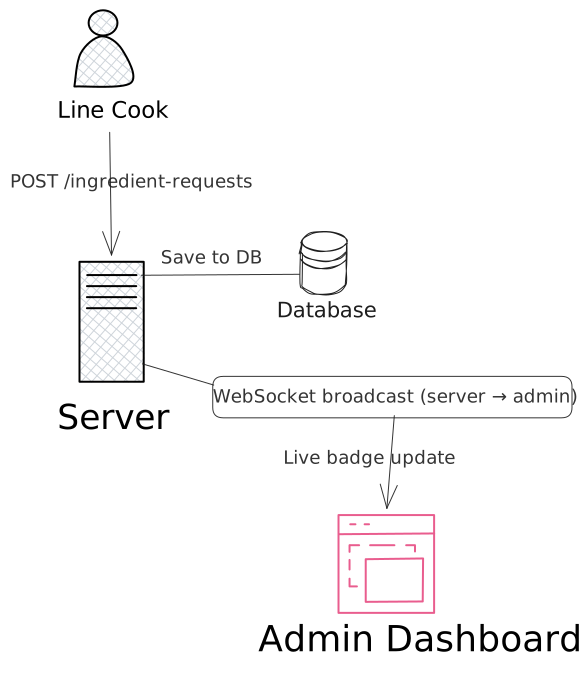
When a line cook submits an ingredient request, the flow is straightforward:
- A REST request (
POST /ingredient-requests) is sent to the server - The server persists the request in the database
- The server broadcasts a WebSocket message to all connected admin clients
The key idea is that the admins did not request this information — the server pushes it to them as soon as the state changes.
This keeps the dashboard in sync in real time without polling or manual refresh.
Direct notifications to staff#
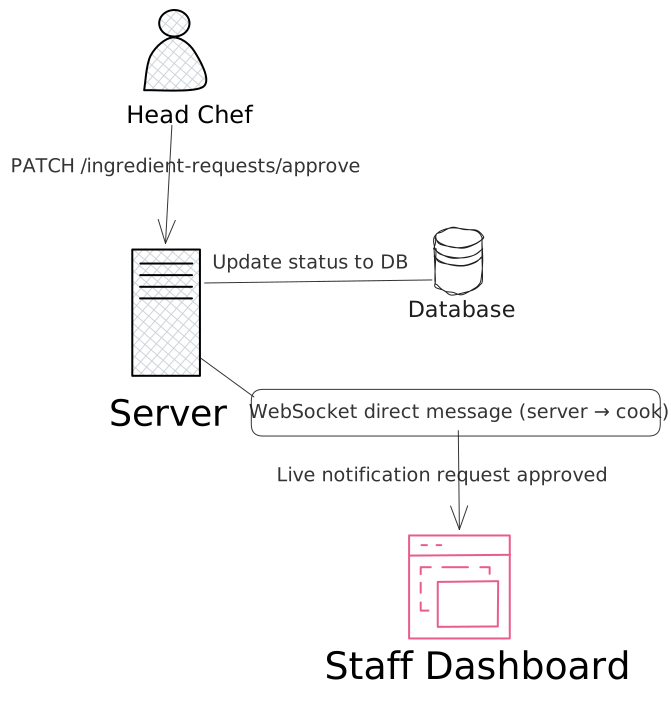
The second flow handles targeted notifications.
When a head chef approves a request:
- A REST request (
PATCH /ingredient-requests/approve) updates the database - The server sends a direct WebSocket message to the specific user who created the request
Unlike the admin case, this is not a broadcast — it is a one-to-one message tied to a specific user session.
Together, these two flows show the real value of WebSockets: the server can either broadcast updates to many clients or send precise messages to one — instantly and without a new request.
Keeping Concerns Separated#
One design decision worth explaining: the notification system is split into two interfaces.
INotificationRegistry is used by the controller — it manages who is connected. INotificationSender is used by the service layer — it sends messages without knowing anything about WebSocket internals. One NotificationService class implements both, and the DIContainer wires it to both consumers:
NotificationService notificationService = new NotificationService();

// Services only see the sender interface
ingredientRequestService = new IngredientRequestService(..., notificationService);

// Controller only sees the registry interface
notificationController = new NotificationController(notificationService, snapshotService);
IngredientRequestService just calls notificationSender.broadcastPendingUpdate(...) — it has no knowledge of WebSocket sessions, connection state, or Javalin internals.
The Snapshot Endpoint#
When an admin first loads the dashboard their WebSocket connection is brand new — they have no idea how many items accumulated while they were away. A REST snapshot endpoint solves the initial load:
GET /notifications/snapshot
→ {"pendingDishSuggestions": 3, "pendingIngredientRequests": 7, "totalPending": 10}
The dashboard calls this once on load to populate the badges, then WebSocket takes over and keeps them current from that point forward.
If the socket reconnects, the client can call the snapshot endpoint again to resync state safely.
Testing It#
WebSocket endpoints cannot be tested with .http files. During development, wscat from the terminal worked well:
wscat -c "ws://localhost:7070/api/v1/notifications?role=HEAD_CHEF&userId=1"Send a REST request, and the admin terminal receives the broadcast within milliseconds:
{"notificationType":"PENDING_COUNT_UPDATED","category":"INGREDIENT_REQUEST","count":2,"timestamp":"2026-03-18 20:51"}
{"notificationType":"REQUEST_APPROVED","itemName":"Hvedemel Type 00","reviewedBy":{"id":1,"firstName":"Gordon","lastName":"Ramsay"},"timestamp":"2026-03-18 20:51"}
A Note on Message Persistence#
One limitation of the current implementation is worth being honest about: if a staff member is not connected when their request gets approved, they never see the notification. WebSocket messages are fire-and-forget — there is no inbox, no history, no replay.
For MiseOS in its current scope this is acceptable. A cook who is not logged in will see the updated status when they next load the page. The notification is a convenience, not the source of truth.
If I wanted to change that — storing messages so they appear next time a user connects — the architecture is already in the right shape for it. A notifications table, a NotificationDAO, and a query on connect to replay unread messages would be the natural extension. Whether that brings enough business value to justify the effort is a different question, and for a kitchen management tool used during active service hours, I would argue probably not.
What it did give me, regardless: a real understanding of stateful server-side communication, session lifecycle management, and the difference between pushing state versus serving it on request. That carries forward into any future project that needs it.
What I Learned This Week#
- Integration tests catch bugs unit tests cannot — routing mistakes, serialization mismatches, wrong status codes.
- Testcontainers is the right answer for database-backed tests — real engine, zero production risk, no leftover state.
- Type-safe extraction in RestAssured avoids fragile string comparisons on dates and enums.
- Some things cannot be asserted automatically — for AI output, test the deterministic parts and verify the rest manually.
- WebSockets and REST solve different problems — REST is request/response, WebSockets are for pushing state changes the client did not ask for.
- Interface segregation is not just theory — splitting
INotificationRegistryandINotificationSenderkept the service layer clean and the controller focused.
Next Step#
Next week security is the focus: implementing authentication and authorization with JWT across the API, replacing the temporary X-Dev-User-Id header and securing both REST and WebSocket entry points.
This is part 7 of my MiseOS development log. Follow along as I build a tool for professional kitchens, one commit at a time.